

Cloudinary Integration
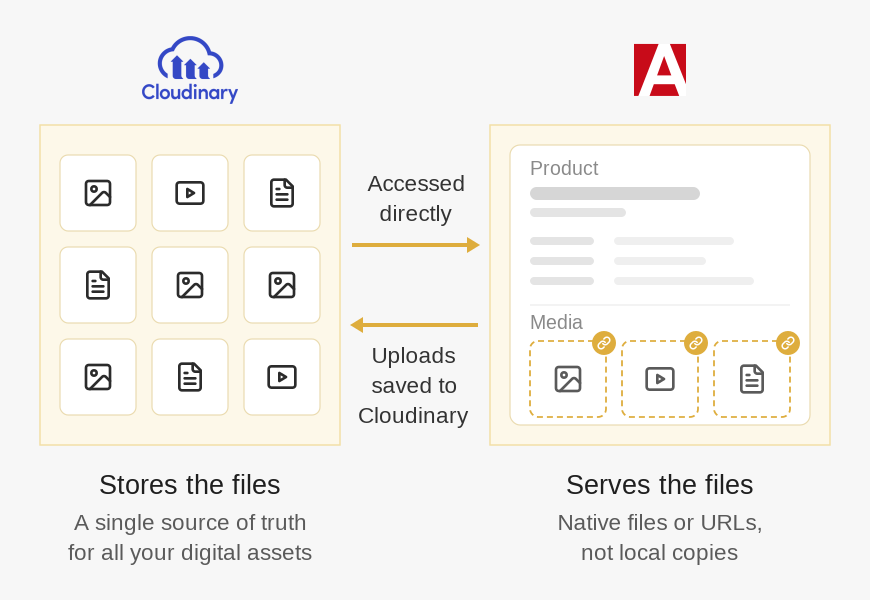
Many companies rely on Cloudinary to host, optimize, and deliver the images and videos that bring their products to life. The AtroCore/AtroPIM Cloudinary integration puts that media library to work without moving a single file: your Cloudinary account is connected as a storage directly inside AtroCore/AtroPIM. The platform indexes your Cloudinary folders and presents their contents as digital assets that can be linked to products and other records, while the originals stay exactly where they are. Any folders you want to keep out of the platform can simply be excluded. This sets the integration apart from typical PIM–DAM connectors, which import a copy of every file and leave teams maintaining the same media in two places. Because the source files never leave Cloudinary, its transformation, optimization, and CDN delivery features remain fully available for every asset. On the AtroCore side, only lightweight thumbnails are kept, so browsing and previewing stay fast even in large media collections.

How It Works
- Cloudinary assets show up in AtroCore/AtroPIM as regular files. They can be previewed, downloaded, and attached to products, categories, or records of any other entity, exactly like files kept on the local server.
- Uploading a file in AtroCore/AtroPIM sends it straight to Cloudinary. Your media library stays complete, and no second file collection builds up inside the PIM.
- Edits made in Cloudinary become visible in AtroCore/AtroPIM right away. No import job or update run is required, so every team works with the latest version of each asset.
- For previews, exports, and syndication to sales channels, you decide how each file is delivered. AtroCore/AtroPIM can fetch it from Cloudinary on request and pass it through as a proxy, without keeping a copy, or it can hand over the file URL alone. This way, the delivery method always matches what the receiving system expects.
- You control which part of your Cloudinary media library the platform can see. Folders holding drafts or content unrelated to products can simply be excluded from the storage.
- Getting started takes a single connection, which links your Cloudinary product environment to AtroCore/AtroPIM as a remote file storage. Once it is in place, everyday work requires no further configuration.
- Cloudinary can run alongside other storage locations, such as the local server, S3-compatible object storage, or SharePoint, so all your file sources are managed within one AtroCore/AtroPIM instance.
Advantages of Integrating Cloudinary with AtroCore/AtroPIM

One Media Library for Every Team
Creative, marketing, and web teams keep managing, transforming, and delivering media in Cloudinary, while product managers draw on exactly the same assets in AtroCore/AtroPIM to enrich product data and publish it to sales channels. Because every department works from one shared asset base, files no longer have to be passed back and forth by hand.

A Leaner PIM Infrastructure
The original files live in Cloudinary, not on the AtroCore/AtroPIM server, so the platform needs far less disk space. This keeps hosting costs down and spares you from backing up the same media twice, once in the DAM and once in the PIM.

Live Access Instead of Copies
AtroCore/AtroPIM works with Cloudinary files directly rather than duplicating them. There are no sync jobs to set up, watch over, or debug, and no outdated media lingering in the PIM. What you see in the platform always matches what is stored in Cloudinary.

Version History That Follows Every Asset
When a file is re-uploaded, the new version takes the place of the old one wherever it is used, from products and categories to sales channels, without any manual relinking. With automatic backup enabled in Cloudinary, earlier versions are kept in its version history, so nothing is lost and any previous state can be restored.